
How it works
From your photo to a transparent PNG, without leaving your device
Backgrounds Remover runs a segmentation model inside your browser tab. Here is each step, what gets downloaded, and how fast it is.
Three steps, all inside your browser
1. Your browser opens the image
The file is read with the File API and decoded by the browser's own image decoder inside a Web Worker. The image is never uploaded.
2. The AI model finds the subject
The pixels go to a WebAssembly engine running the IS-Net model, which scores every pixel as foreground or background.
3. You get a transparent PNG
That score becomes the alpha channel of your original pixels. The transparent PNG at your image's size is encoded in the worker; for white, a color, or a square size, the page's own script in your tab composes and encodes the file before you save.
The model: IS-Net
The cutout comes from IS-Net, a model published by the authors of the DIS (Dichotomous Image Segmentation) research project at ECCV 2022. It takes a 1024 x 1024 view of your image and predicts, for every pixel, how likely it is to belong to the main subject. That prediction is resized back to your image and used as its transparency, so soft edges such as hair keep partial transparency instead of a hard outline.
The engine: ONNX Runtime compiled to WebAssembly
The model runs in ONNX Runtime, Microsoft's open-source inference engine, which we compile from source to WebAssembly together with our own C++ pre- and post-processing. There is no prebuilt third-party runtime. Four builds exist, and the page picks one when you start:
- WebGPU when your browser exposes a graphics adapter. This build is WebAssembly too, and the model's heavy math runs on the GPU.
- Multi-threaded CPU when WebGPU is not available. The page sends the cross-origin isolation headers that WebAssembly threads require, and runs one thread per logical core (hardware thread).
- Single-threaded builds of both, used automatically if the browser cannot run threads. The single-threaded CPU build is slower (29.9 s in the benchmark below, against 13.8 to 16.0 s with four threads; the single-threaded WebGPU build has not been timed); in our tests the single-threaded CPU build's cutout stays within 3 levels out of 255 of the expected result, the same bar the threaded CPU build meets.
If the graphics card fails to start the model, the page switches to the CPU build on its own.
Why your image is never uploaded
Decoding, the model, and the transparent PNG at your image's size run in a Web Worker in your tab; putting the subject on white, a color, or a square size is done by the page's own script in the same tab. The server has no endpoint that accepts an image. See what the site receives, what stays in your browser, and how to check it yourself.
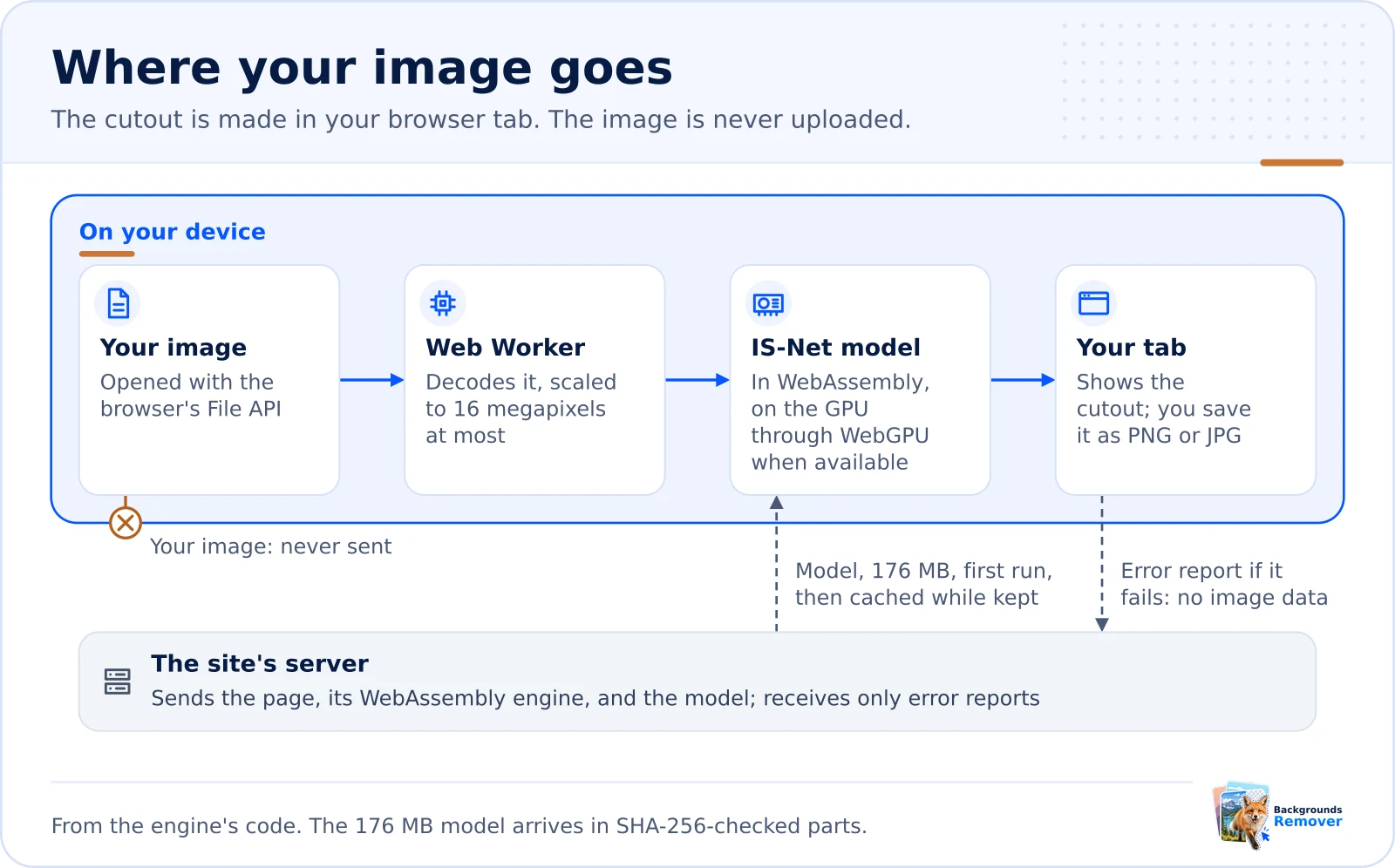
The first run downloads the model
The model file is 176 MB. It is served in parts smaller than 25 MB, and each part is checked against a SHA-256 fingerprint before use, so a corrupted download is rejected instead of producing a broken result. Verified parts are kept in your browser's Cache Storage, so later images, and later visits while the browser keeps them, skip the download.
How fast it is
These figures come from the engine's own benchmark on a cloud server with 4 virtual CPUs (four threads) and 15 GB of memory, in headless Chrome, with the CPU builds. They are a reference point, not a promise: your time depends on your processor, and WebGPU timings on real graphics cards have not been measured yet. The memory row was measured on the same kind of server in desktop Chromium, with a fresh tab for each photo.
| What | Measured |
|---|---|
| AI model download (first use) | 176 MB |
| WebAssembly engine download (CPU build) | 11.3 MB |
| Whole run in Chrome, 4 threads, 512 x 512 image | 13.8 s |
| Whole run in Chrome, 4 threads, 451 x 300 image | 16.0 s |
| Whole run in Chrome, single-threaded CPU build, 640 x 427 image | 29.9 s |
| Peak memory of the browser tab, typical photo (desktop Chromium, 4 threads) | about 1.2 GB |
| Peak memory of the browser tab, 16-megapixel photo (desktop Chromium, 4 threads) | about 1.6 GB |
Limits worth knowing
- Images above 16 megapixels are scaled down first, so the image you download is at most 16 megapixels. The square Size options crop to the subject; 1080 x 1080 and 2048 x 2048 enlarge a smaller cutout, which can look soft.
- In our measurement in desktop Chromium on a computer with 4 virtual CPUs, the browser tab used about 1.2 GB of memory for a typical photo and up to about 1.6 GB for a 16-megapixel photo. Processing many large photos in one visit can take the tab to about 2 GB. Phones and tablets with little free memory may fail; the page tells you when it can detect this, and on some phones the browser reloads the tab instead.
- The model keeps the most prominent subject. Fine hair, fur, glass, and smoke can come out imperfect, and busy scenes with several subjects may keep or drop parts you did not expect.
- The result is a PNG with a transparent, white, or custom-color background, or a JPG when the background is white or a color (JPG cannot be transparent). Placing the subject on another photo is a job for your image editor, and so is edge cleanup: see how to clean up halos and rough edges.
What we tested it on
Besides the photo fixtures used to check the engine's accuracy, we ran three typical test images through the site's engine (its CPU build) on September 17, 2026, and looked at every edge on a checkerboard:
- A flat logo on white: clean edges, and the enclosed gap inside the check mark became transparent too. See logos to transparent PNG.
- A signature in blue ink on textured paper: the bold main stroke came out cleanly, but a thin, light underline mostly disappeared. Use a bold pen; see transparent signatures.
- A studio portrait: hair edges kept their partial transparency, with a little background left next to a large dark object at the frame edge. See headshot backgrounds.
The open-source components and their licenses are listed on the open-source credits page.
Background removal guides
Continue exploring this topic
Related topics: Privacy and on-device processing
Try it on your own photo
Runs in your browser. Your image never leaves your device.